

Description
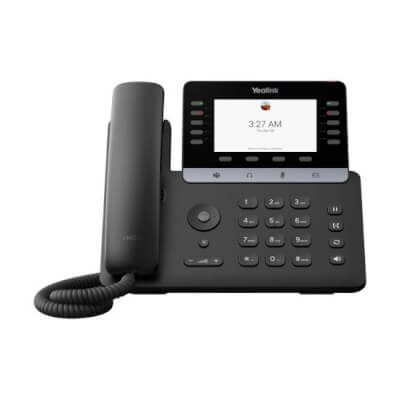
The Yealink MP55 E2 is a Microsoft Teams phone that relies on physical keys rather than an all-touch interface. Its 4.3-inch color display is paired with 10 LED line keys and dedicated Hold, Transfer and Redial keys, to handle calls without digging through menus. It runs Android 15 and integrates the Microsoft Device Ecosystem Platform (MDEP), which strengthens security and simplifies deployment from the Teams Admin Center or the Yealink YMCS platform. Optima HD Voice audio, AI noise cancellation, Acoustic Shield and the full-duplex speakerphone with AEC keep conversations intelligible in a shared space. Dual-band Wi-Fi 6 and Bluetooth 5.0 are built in, USB headsets are supported, and the two Gigabit Ethernet ports accept PoE 802.3af class 3. The hybrid mode lets a SIP account and Teams coexist on the same phone.
Specifications
| Reference | MP55 E2 |
|---|---|
| Brand | Yealink |
| Manufacturer order code | 1301231 |
| Type | Microsoft Teams desk phone |
| EAN code | 6938818324824 |
| Platform | Microsoft Teams, Microsoft Device Ecosystem Platform (MDEP), SIP/Teams hybrid mode |
| Operating system | Android 15 |
| Display | 4.3" color, non-touch |
| Keys | 10 LED line keys, dedicated Hold, Transfer, Redial keys |
| Audio | Optima HD Voice, AI noise cancellation, Acoustic Shield, full-duplex speakerphone with AEC |
| Network | 2 x RJ45 10/100/1000 |
| Wi-Fi | Dual-band 2.4/5 GHz Wi-Fi 6 |
| Bluetooth | 5.0 built in |
| Headset | USB headsets supported |
| Management | Microsoft Teams Admin Center, Yealink YMCS |
| Power | PoE 802.3af class 3 or power adapter |
| Power consumption | 1.8 to 7.0 W on PoE, 1.7 to 7.0 W on the power adapter |
| Mounting | Desk, optional MP55 wall mount |
| Packed weight | 1.056 kg |
Use and tips
The MP55 E2 is the Teams phone for reception desks, call centers and shared spaces where speed matters: the 10 line keys and the Hold, Transfer and Redial keys handle a high call volume without going through a touchscreen, and the full-duplex speakerphone stays intelligible in a noisy office. It deploys in bulk from the Teams Admin Center or YMCS, and its hybrid mode eases a gradual transition from a SIP PBX. Connect it to a PoE 802.3af switch or a power adapter, and fix it to the wall with the optional MP55 mount if needed. For a touchscreen, see the MP54 E2 or the MP56 E2.
Frequently asked questions
Which environment does this phone work with?
It is built for Microsoft Teams: native Teams interface, dedicated Teams button and management from the Teams Admin Center or the Yealink YMCS cloud platform. Tell us about your environment through our contact page and we confirm compatibility before you order.
Does it also work with a SIP PBX?
Yes, thanks to the SIP/Teams hybrid mode: the phone can run a SIP account alongside Microsoft Teams and switch between them, which eases a gradual migration to Teams.
What is the warranty?
Two-year statutory conformity warranty, plus the Yealink manufacturer warranty under its own terms.
Where are the firmware, manuals and guides?
Yealink provides the firmware, user manual and administrator guide of this phone free of charge: our Yealink support page takes you straight to the documents for this model.