


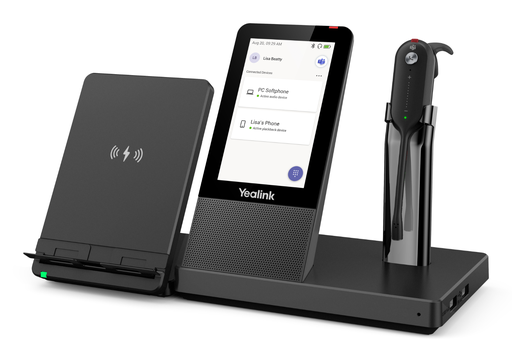

Description
The WHC60 is a wireless charging stand designed for the Yealink WH66 and WH67 headsets. It installs directly on the headset base, with no cable or configuration, and charges the smartphone placed on it. Once the mobile is paired with the headset over Bluetooth, the WHC60 acts as a workstation: the phone stays charged, the stand angle adjusts for a clear view of the screen, and calls or video meetings started from the mobile benefit from the headset audio. A compact accessory, in black, designed for desks where the smartphone has become a communication tool in its own right.
Specifications
| Reference | WHC60 |
|---|---|
| Brand | Yealink |
| Manufacturer order code | 1308017 |
| Type | Wireless charger |
| EAN code | 6938818306967 |
| Compatibility | WH66, WH67 |
| Charging type | Wireless (Qi), contact |
| Charged devices | Smartphone |
| Setup | Plug and play on the headset base, no cable |
| Stand | Adjustable angle |
| Use | Indoor |
| Color | Black |
| Package dimensions | 102 x 138 x 30 mm |
| Packed weight | 0.27 kg |
Use and tips
The WHC60 is meant for WH66 or WH67 headset users who juggle a desk phone, a computer and a smartphone: sales staff, managers, consultants, home workers. Sitting on the headset base, it removes the mobile charger cluttering the desk and puts the phone in view for a video meeting or a call taken on the mobile. It has no use on its own: a WH66 or a WH67 is required to use it. Check that your smartphone supports Qi wireless charging before ordering.
Frequently asked questions
Which headsets does this charger work with?
With the Yealink WH66 and WH67 DECT headsets, in both UC and Teams versions. It does not work on its own or with other models. For another headset, tell us its reference through our contact page and we confirm compatibility.
Does it need a cable or a power supply?
No. The WHC60 plugs directly into the WH66 or WH67 headset base, which powers it. Just fit it and place the smartphone on top.
What is the warranty?
Two-year statutory conformity warranty, plus the Yealink manufacturer warranty under its own terms.
Where are the firmware, manuals and guides?
Yealink provides the firmware, user manual and administrator guide of this module free of charge: our Yealink support page takes you straight to the documents for this model.
Product compatibility
Compatible devices
This accessory is offered for the devices below.

Yealink WHC60 wireless charger
Availability to be confirmed
55.90 €
incl. VAT
55
Dakota Points
Create an account to earn these points and get €5 off from 500 points.
Create account
Sign in
