
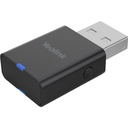


Description
The WF40 is a compact, low-power Wi-Fi key that plugs into the USB port of a compatible Yealink IP phone to connect it to the wireless network, without an Ethernet cable. Compliant with the IEEE 802.11 b/g/n standards on the 2.4 GHz band, it delivers 150 Mbit/s, more than enough for voice, and supports WEP, WPA and WPA2 encryption. Recognized automatically by the phone, it needs no driver: just select the network and enter the key from the phone menu. At 27 mm long, it stays out of the way behind the phone.
Specifications
| Reference | WF40 |
|---|---|
| Brand | Yealink |
| Manufacturer order code | 1300060 |
| Type | USB Wi-Fi dongle |
| EAN code | 6938818301245 |
| Compatibility | T27G, T29G, T41S, T42S, T46G, T46S, T48G, T48S, T52S, T53, T54S |
| Minimum firmware | T48G: 35.80.0.95; T29G, T46G, T46S, T48S: 81; T27G, T41S, T42S: x.81.0.110 |
| Wi-Fi standard | IEEE 802.11 b/g/n (Wi-Fi 4) |
| Data rate | 150 Mbit/s |
| Frequency band | 2.4 GHz |
| Security | WEP, WPA, WPA2 |
| Interface | USB 2.0 |
| Dimensions | 26.9 x 18 x 8 mm |
| Packed weight | 0.059 kg |
Use and tips
The WF40 is meant for companies that must place a Yealink phone in a room without a network socket or on a temporary desk: reconfigured office, annex room, workshop, practice set up in older premises. It avoids pulling an Ethernet cable and drilling walls. Since the phone is no longer powered by PoE, plan its power adapter. Check the model and firmware version before ordering: the WF40 is limited to the T27G, T29G, T41S, T42S, T46G, T46S, T48G, T48S, T52S, T53 and T54S. For the T42U, T43U, T46U and T48U, or for 5 GHz Wi-Fi, choose the WF50.
Frequently asked questions
Is this dongle compatible with my phone?
It works with the Yealink T27G, T29G, T41S, T42S, T46G, T46S, T48G, T48S, T52S, T53 and T54S, with the minimum firmware version listed in the specifications. For another model, tell us through our contact page and we point you to the right dongle.
Is the phone still powered when on Wi-Fi?
No: without an Ethernet cable, there is no PoE. The phone must be powered by its power adapter, sold separately.
What is the warranty?
Two-year statutory conformity warranty, plus the Yealink manufacturer warranty under its own terms.
Where are the firmware, manuals and guides?
Yealink provides the firmware, user manual and administrator guide of this module free of charge: our Yealink support page takes you straight to the documents for this model.

