
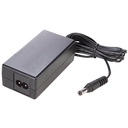

Description
This Yealink mains adapter delivers 48 V and 0.7 A to power the Yealink video conferencing and meeting room equipment listed by the distributor: UVC40, UVC80, VC500, VC800, ME400, ME600 and A30. It replaces an original adapter lost during a room move or that has failed, and avoids taking a whole room out of service for a simple power supply. The reference contains the mains adapter only. Compare the voltage and current printed on the label of your old adapter before ordering, Yealink desk phones use other voltages.
Specifications
| Reference | 330000025036 |
|---|---|
| Brand | Yealink |
| Manufacturer order code | 330000025036 |
| Type | Power adapter |
| Compatibility | UVC40, UVC80, VC500, VC800, ME400, ME600, A30 |
| Output voltage | 48 V |
| Output current | 0.7 A |
| Contents | 1 power adapter |
| Packed weight | 0.17 |
Use and tips
This power adapter is meant for IT departments and integrators running meeting rooms fitted with Yealink UVC, VC, ME or A30 equipment: it brings a room back into service quickly after the original adapter is lost or fails, or serves as a spare kept in stock for a fleet of several rooms. Before ordering, check that your device appears in the compatibility list and that its label mentions 48 V. For the Yealink A20 and A30 with a 6.5 mm DC plug, reference 330000025005 is intended.
Frequently asked questions
Does this power adapter suit my equipment?
It is listed for the Yealink UVC40, UVC80, VC500, VC800, ME400, ME600 and A30. For another model, tell us through our contact page and we check the suitable reference.
What is the difference with reference 330000025005?
Both adapters deliver 48 V / 0.7 A. Reference 330000025005 is intended for the Yealink A20 and A30 with a 6.5 mm DC plug and connects through a two-pole cable sold separately; this one covers the UVC, VC, ME and the A30.
What is the warranty?
Two-year statutory conformity warranty, plus the Yealink manufacturer warranty under its own terms.
Where are the firmware, manuals and guides?
Yealink provides the firmware, user manual and administrator guide of this module free of charge: our Yealink support page takes you straight to the documents for this model.

